3D Clash Detection and 3D Printer for Architectural Models How BIM and Arch Viz Save Commercial Builds

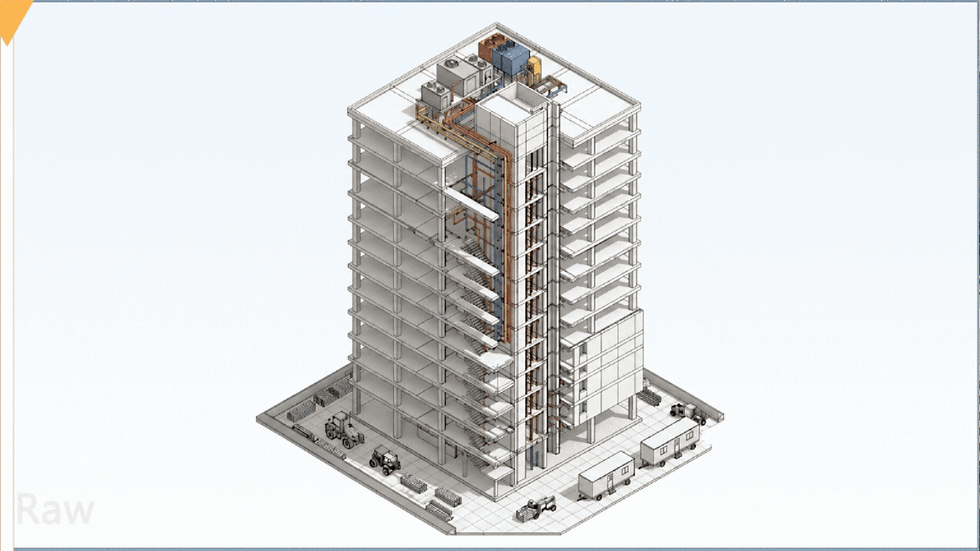
A commercial building fails first on coordination, not concrete. A duct crosses a beam. A sprinkler pipe blocks a ceiling cassette. A drainage slope cuts through a slab. If the team finds this on site, the cost is high. If BIM finds it early, the saving can run into lakhs or crores on large builds.
That is where BIM, clash detection, architectural 3D printing, and arch viz work together. One catches technical conflicts. One turns the design into a physical model. One helps stakeholders see the finished space before work starts.

Why clashes become expensive on commercial projects
Commercial buildings carry dense systems. A mall, hospital, airport, hotel, IT park, or mixed-use tower has much more than walls and slabs.
It has:
Structural framing
HVAC ducts and AHUs
Fire-fighting lines
Plumbing and drainage
Electrical trays and conduits
Data and security systems
Lift cores and shafts
False ceilings
Facade brackets
Interior fit-out elements
These systems often compete for the same space. The ceiling void is a common example. A 600 mm deep duct, a sprinkler main, a cable tray, and a recessed light may all need to pass through one tight zone.
On a 2D drawing, each consultant may look correct. The structure drawing shows beams. The HVAC drawing shows ducts. The fire drawing shows pipes. The interior reflected ceiling plan shows lights. The conflict becomes visible only when all models sit in the same 3D space.
When no one catches it early, the site pays for it.
Typical site impact includes:
Breaking and redoing installed work
Delayed ceiling closure
Extra material, labour, and equipment cost
RFIs and approval delays
Design changes under pressure
Safety risks during rework
Loss of trust between client, architect, contractor, and consultant
On large commercial builds, one repeated coordination error across many floors can cost far more than the BIM process that would have prevented it.
How 3D Clash Detection saves money before construction starts
3D Clash Detection is the process of checking BIM models for conflicts between building elements. The software compares geometry from different disciplines and flags collisions, clearance issues, and spatial conflicts.
The goal is not to generate a long report. The goal is to resolve the right conflicts at the right time.
The main types of clashes
Clash type | What it means | Common example |
Hard clash | Two elements occupy the same space | A duct passes through a beam |
Soft clash | An element lacks required clearance | A panel cannot open because a pipe blocks access |
Workflow clash | The sequence of work creates a site issue | A heavy unit cannot be installed after walls close |
Hard clashes are easy to understand. Soft and workflow clashes often save more money. They prevent maintenance problems and access issues that stay with the building for years.
For example, a chilled water valve may not hit a wall. Yet if a technician cannot reach it after the ceiling closes, the design still fails. Good clash reviews catch this.
Why late clashes cost more
A clash found during design may need a model change and consultant approval. A clash found on site may need cutting, shifting, refunding, reordering, retesting, and rescheduling.
The cost rises because work has already started.
A single MEP clash can affect:
Duct fabrication
Ceiling levels
Fire line routing
Light positions
Interior drawings
Shop drawings
Material orders
Labour schedules
This is why BIM coordination is not a “nice to have” on commercial projects. It protects the budget.

What a strong BIM clash workflow looks like
A good clash workflow starts with clean inputs. Poorly built models create false clashes and confusion. The process must match the project stage.
Build discipline models with agreed standards
Each consultant or BIM team creates a model for their discipline. This can include architecture, structure, HVAC, electrical, plumbing, fire protection, facade, and interiors.
The team should agree on:
Model origin and coordinates
Levels and grids
Naming rules
LOD requirements
File exchange format
Clash tolerance
Model revision cycle
Responsibility matrix
If these basics fail, coordination slows down.
Federate the models
A federated model combines all discipline models without merging ownership. Each team keeps control of its model. The BIM coordinator brings them together for review.
This single view helps teams see how the building works as a whole.
Run targeted clash tests
The coordinator should avoid running every possible check at once. That creates noise.
Useful clash tests include:
Structure versus HVAC
Structure versus plumbing
Structure versus electrical trays
Fire pipes versus ducts
Ceiling systems versus MEP
Facade anchors versus structure
Equipment zones versus access clearances
The point is to find buildable issues, not inflate clash counts.
Prioritise clashes by cost and site impact
Not every clash has the same value. A small pipe overlap in a plant room may be easy to resolve. A main duct through a transfer beam can affect design, fabrication, and approval.
High-priority clashes usually affect:
Structural elements
Major MEP routes
Floor-to-floor height
Ceiling height
Fire safety
Maintenance access
Long-lead equipment
Repeated layouts across floors
Repeated clashes matter most. If one hotel room module has a mistake, it may repeat across hundreds of rooms. If one typical office floor has a ceiling conflict, it may repeat across 20 floors.
Close the loop with issue tracking
Clash review only works when every issue has an owner and status.
A clear issue record should include:
Clash location
Screenshot or viewpoint
Discipline involved
Assigned owner
Required action
Due date
Resolution status
Model version
This keeps the process accountable. It also gives the client proof that coordination is improving.
Where 3D printing fits into architectural models
BIM coordination solves technical conflicts. A 3D printer for architectural models solves a different problem. It turns digital design into a physical object that people can understand fast.
Physical models still matter because they show massing, scale, proportions, access, and context in a direct way. Clients, planning teams, sales teams, and non-technical stakeholders can read a model without software training.
3D printing does not replace BIM. It uses BIM and 3D model data as a base.
Common 3D printing methods for architectural models
Method | Best use | Notes |
FDM printing | Massing models, site models, quick studies | Uses thermoplastic filament such as PLA. Good for larger, lower-cost models |
SLA printing | Fine facade details, interiors, small parts | Uses resin. Better surface finish and detail |
SLS printing | Durable complex parts | Uses powder-based printing. Useful for intricate forms, but usually higher cost |
FDM is common for architecture schools and early design models. SLA works well for detailed towers, facade screens, railings, and interior elements. Many professional model makers combine 3D printing with laser cutting, CNC, hand finishing, painting, and lighting.
What files are used for 3D printed models
A print-ready architectural model often starts in BIM or 3D software. The model then needs cleaning.
Common steps include:
Remove tiny non-printable parts
Thicken fragile walls and columns
Close open surfaces
Split large buildings into printable parts
Add base plates or support structure
Export to STL, OBJ, or 3MF
Set scale, orientation, and supports
Print, sand, assemble, and finish
BIM models are rich in data, but they are not always print-ready. A BIM model may include thin glazing, tiny railings, complex MEP systems, and layered wall assemblies. These need simplification for physical printing.
Useful scales for commercial models
The right scale depends on the purpose.
Scale | Suitable for |
1:500 | Site context, campus, master planning |
1:200 | Building massing and public realm |
1:100 | Facade studies and spatial planning |
1:50 | Interiors, lobbies, rooms, amenity zones |
1:20 or 1:10 | Detail studies, facade joints, feature elements |
A commercial real estate model may use 1:200 for the full building and larger scale inserts for key spaces. This keeps the model readable without making it too large.

BIM and 3D printing work better together
The best results come when the digital and physical workflows support each other.
BIM gives structure to the design. It carries geometry, levels, elements, and coordination logic. 3D printing gives tactile feedback. It helps people see form and scale.
Together, they improve decisions in these areas:
Design reviews become clearer
A BIM model can show exact systems. A printed model can show massing and context. A rendered walkthrough can show experience.
Each format answers a different question.
BIM asks if the building can be coordinated and built.
A physical model asks if the form and scale feel right.
Arch viz asks if the space communicates the intended experience.
Client approvals move faster
Many clients do not read construction drawings daily. A physical model and a clear walkthrough reduce confusion. They also help clients spot design preferences early.
This matters on commercial projects where late changes affect procurement, approvals, and site planning.
Sales and leasing teams explain projects better
For real estate, hospitality, retail, and office projects, visual material affects understanding. A leasing team can use a physical model to explain access, drop-off, towers, amenities, and views. A walkthrough video can show arrival, lobby, workspace, landscape, and night lighting.
The design becomes easier to present without overloading people with technical drawings.
Arch viz adds the layer BIM cannot show alone
BIM is technical by nature. It shows what the building is made of and how parts fit. Architectural visualisation shows how the space will feel, move, and function.
This is useful before construction, during approvals, and before launch.
Good arch viz can include:
Camera-path based walkthroughs
Interior and exterior renders
Massing and phasing videos
MEP and engineering explainers
AR and VR experiences
Launch films and project promos
This visual layer helps clients, investors, users, and approval teams understand the project faster. It also reduces repeated explanation from the design team.
For example, an engineering animation can show how a basement ventilation system works. A BIM animation can show construction sequencing. A VR walkthrough can help review a hotel lobby before marble, lighting, and furniture are ordered.
Where the real savings come from
The phrase “saves millions” sounds big. On commercial builds, it is realistic when the project scale is large and coordination starts early.
The saving does not come from one tool. It comes from fewer wrong decisions.
Fewer site changes
When teams resolve clashes before construction, site changes reduce. That protects labour productivity and material planning.
Faster approvals
Clear 3D models, physical models, and visualisations help stakeholders approve design intent with fewer doubts.
Better procurement
Coordinated models help teams plan fabricated elements with more confidence. This matters for ducts, facade systems, steel, MEP racks, and modular interior packages.
Lower rework
Rework costs more than original work. It also affects morale and schedule. BIM coordination reduces avoidable rework before it reaches the site.
Stronger communication
A single coordinated model, a 3D printed massing model, and a walkthrough can align technical and non-technical stakeholders. That reduces conflicting instructions.
The cheapest clash to fix is the one found before anyone orders material or starts installation.

When to use each tool in the project timeline
A practical commercial workflow can look like this:
Project stage | Best tools | Main outcome |
Concept design | Massing model, early renders, basic 3D print | Test form, height, context, and client direction |
Schematic design | BIM model, visual studies, 3D printed options | Compare layouts and key design choices |
Design development | Federated BIM, clash checks, detailed renders | Resolve technical conflicts and lock major systems |
Tender and construction | Coordinated BIM, shop drawing support, animations | Support contractors and explain build sequence |
Sales and launch | Walkthroughs, VR, project trailers, physical model | Present the project clearly to buyers, tenants, or investors |
Handover and operations | As-built BIM, system animations | Support facility teams and maintenance planning |
Early use matters. If BIM coordination starts after shop drawings, many decisions are already locked. If visualisation starts after construction, it loses its power as a decision tool.
Mistakes to avoid
Many teams buy tools but miss the process. That wastes money.
Avoid these mistakes:
Treating BIM as only a 3D drawing
Running clash detection too late
Ignoring soft clashes and maintenance access
Printing models directly from complex BIM files without cleanup
Using renders that look good but do not match the actual design
Keeping BIM, model making, and visualisation teams disconnected
Not assigning clash ownership
Skipping updates after design changes
The strongest projects keep all visual and technical outputs aligned. The BIM model, printed model, walkthrough, and renders should tell the same story.
How Film by Him supports BIM, model-led storytelling, and arch viz
Commercial projects need clear technical coordination and clear presentation. One without the other creates gaps. A coordinated BIM model may still need a strong visual narrative. A beautiful render may fail if it does not match the buildable design.
Film by Him provides architectural visualisation services that support both understanding and presentation. The team offers a one-stop solution for arch viz needs, including 3D Walkthrough Videos, 3D BIM Modeling, 3D BIM Animations, AR and VR Walkthrough Videos, Engineering Animation Videos, and Project trailers and Promo's.
For developers, architects, consultants, and project teams, this helps turn design information into clear visual communication. It also supports approvals, marketing, sales, leasing, and stakeholder reviews.
If you want arch viz support for a commercial project, connect with the team here: Explore Film by Him architectural visualisation services.
The takeaway
BIM clash detection protects the budget. A 3D printer for architectural models improves understanding. Arch viz turns technical design into a clear experience.
Use them early. Keep them connected. Let BIM catch conflicts, let physical models explain scale, and let visualisation communicate the final space with confidence. That is how commercial builds avoid costly mistakes before they reach the site.
Your Next Big Dream Project Deserves Better Than Average ArchViz. Let’s Connect and Make It Unforgettable.


Comments