
Integrating 3D BIM and VR Walkthroughs for Real Time Spatial Analysis with Film by Him


Construction teams lose time when design intent, site reality, and stakeholder feedback sit in separate systems. A drawing says one thing. The site shows another. A meeting produces a third interpretation. Integrating 3D BIM with VR walkthroughs reduces that gap.
The model becomes more than a design file. It becomes a spatial decision tool. Teams can walk through a proposed building, compare it with site conditions, detect access issues, assess clearances, and explain construction sequences before work reaches a costly stage.
This is where real time spatial analysis matters. It helps architects, engineers, contractors, developers, and clients understand space as it will be built, not as a flat drawing suggests.
What integration means in practical terms
A 3D BIM model contains geometry, data, and relationships. It can include walls, slabs, MEP systems, structural members, finishes, equipment, door swings, ceiling heights, material data, and asset information.
A VR walkthrough turns that model into an immersive environment. Users can move through rooms, corridors, plant rooms, service areas, podium levels, basements, and external spaces at human scale.
When both systems connect properly, the result is not just a visual experience. It becomes a working spatial analysis layer.
A well-integrated setup can support:
Walkable building interiors at true scale
Clash and clearance review in a human-centred view
Site-specific design validation
Faster stakeholder approvals
Construction sequence communication
Safety and access planning
Real time comments during coordination reviews
Better understanding for non-technical decision-makers
The main value is clarity. People do not need to imagine what a 1:50 drawing means. They can stand inside the model and see the issue.
Why 2D drawings are not enough for spatial decisions
2D drawings remain essential. Every project still needs plans, sections, elevations, schedules, and working drawings. But drawings demand interpretation. Not everyone reads space correctly from lines and symbols.
This creates risk.
A corridor may meet code in plan but feel too tight when doors open. A ceiling void may look sufficient until ducts, cable trays, sprinklers, and access panels compete for space. A luxury lobby may appear generous in elevation but feel compressed when the ceiling, lighting, furniture, and entrance sequence are experienced together.
VR walkthroughs expose these issues early.
They help teams answer practical questions:
Can two people pass comfortably through this corridor?
Does the reception desk block movement?
Will maintenance staff access the AHU safely?
Is the escalator landing clear enough?
Will parking ramps feel too tight for actual vehicle movement?
Are MEP services reachable after installation?
Does the view from the entrance match the design intent?
Does the site hoarding or temporary path affect movement?
These are spatial questions. They need spatial review.

How 3D BIM supports real time VR walkthroughs
A BIM model is not automatically ready for VR. It must be prepared with care. Design models often contain heavy geometry, unused elements, complex families, and data not needed for real time playback.
To create a useful VR environment, teams usually follow a structured process.
The model is cleaned and prepared
Before export, the model needs review. Duplicate elements, hidden geometry, overly detailed families, and unfinished components can slow the VR experience.
Large projects may need model separation by zones, floors, disciplines, or construction packages.
Useful preparation includes:
Removing unnecessary model detail
Checking element categories
Naming key spaces clearly
Assigning materials correctly
Simplifying heavy components
Maintaining true scale
Keeping the coordinate system consistent
Preserving important metadata where needed
This step decides whether the walkthrough feels clear or confusing.
The model is exported into a real time engine
VR experiences often use real time engines such as Unreal Engine or Unity. BIM authoring tools and coordination platforms can also connect through formats such as IFC, FBX, Datasmith, or other supported exchange methods.
The goal is to retain geometry, material logic, scale, and spatial accuracy while making the scene light enough for smooth viewing.
This is not a simple file conversion. It needs visual judgement and technical control.
Materials, lighting, and scale are refined
A raw BIM export can look flat. Materials may appear dull. Glass may not behave correctly. Lighting may not represent the actual ambience. Scale may be correct mathematically but still feel wrong if cameras, eye height, and movement settings are not calibrated.
Good VR preparation includes:
Human eye-level navigation
Realistic walking speed
Correct room and furniture scale
Clean material assignment
Balanced natural and artificial lighting
Accurate shadows where needed
Usable navigation controls
Clear viewpoints for review sessions
Spatial analysis works only when the virtual environment feels believable.

Review tools are added
A VR walkthrough becomes far more useful when teams can mark, measure, compare, and comment.
Depending on the project scope, interactive tools can include:
Distance checks
Height checks
Element tagging
Viewpoint saving
Issue markers
Design option switching
Daylight and lighting scenes
Layer visibility controls
Construction stage toggles
These tools turn visualisation into decision support.
What real time on-site spatial analysis can reveal
Real time spatial analysis links the virtual model to actual project needs. It can be used before construction, during construction, and before handover.
Project stage | What VR spatial analysis helps check | Practical value |
Concept design | Massing, entry sequence, visual flow, space planning | Faster design evaluation |
Design development | Room sizes, ceiling levels, circulation, access points | Better spatial decisions |
Coordination | MEP clearances, structural conflicts, service access | Fewer late changes |
Site execution | Installation sequence, safety zones, temporary works | Clearer site planning |
Client review | Finishes, views, layouts, amenity spaces | Better approvals |
Facility handover | Equipment access, asset location, maintenance paths | Easier operations |
This is valuable in residential towers, villas, hospitals, hotels, commercial buildings, industrial facilities, educational campuses, transport spaces, and mixed-use developments.
MEP and services coordination
MEP systems create many site-level problems. Ducts, pipes, cable trays, fire systems, access panels, and structural members all need space.
A coordination drawing may show a clash. A VR walkthrough shows how that clash affects people, installation, and maintenance.
For example, a service shaft may fit on plan. But VR can reveal that a maintenance worker cannot access a valve without removing another component. A false ceiling may look acceptable until the model shows that access panels fall above fixed furniture or lighting features.
These findings prevent rework.
Safety planning and access review
Spatial analysis also supports safer construction planning. Teams can review temporary access routes, storage zones, crane visibility, scaffold areas, edge protection, and emergency movement paths.
VR does not replace safety engineering. It helps communicate risk clearly.
Site teams can test questions like:
Where will material movement happen?
Will a temporary path cross active work zones?
Can equipment be installed without blocking egress?
Is there enough clearance for lifting and shifting?
Are workers forced into awkward access positions?
When people see risk in a walkable environment, they understand it faster.
Client and stakeholder approvals
Clients often approve drawings without fully understanding scale, proportion, and spatial feel. This leads to late requests.
A VR walkthrough reduces that uncertainty.
A buyer can experience a sample apartment. A hotel owner can walk through a mock-up room. A developer can review a sales gallery, lobby, amenity deck, landscape path, or clubhouse before physical execution.
The same applies to public infrastructure and institutional projects. Non-technical stakeholders can understand the design without reading complex drawing sets.

The data layer makes the experience more than visual
The best VR environments are not only beautiful. They are connected to project information.
A wall in the model can carry fire rating data. A pump can include equipment information. A façade panel can be linked to material data. A room can carry area, finish, and occupancy information.
This data layer supports better decisions.
For example:
Facility teams can identify equipment before handover
Engineers can review access needs for plant rooms
Design teams can compare finish options
Contractors can understand construction packages
Clients can track scope and specifications visually
The challenge is deciding how much data to bring into VR. Too little data limits usefulness. Too much data clutters the experience.
The right approach depends on the use case. A marketing walkthrough needs different information from an engineering review model.
Common technical challenges and how to manage them
BIM-to-VR integration has real limits. Ignoring them leads to slow, inaccurate, or unusable walkthroughs.
Heavy models can affect performance
BIM models contain detailed geometry. A single project can include thousands of objects. Real time VR needs smooth frame delivery, especially to avoid discomfort.
Model simplification is essential.
Teams may need to reduce polygon counts, replace heavy elements, bake lighting, compress textures, or split large developments into zones.
Model accuracy must be protected
A VR file must not distort scale. Even small errors can mislead teams. Units, coordinates, levels, grids, and origin points need careful handling.
For India-based projects, teams often work across millimetres in drawings, metres in site planning, and varied export settings across software. This must be checked before reviews.
Visual quality and technical speed need balance
A highly realistic VR scene may be too heavy for some devices. A very light scene may fail to communicate finish and ambience.
The solution is to define the purpose early.
If the goal is spatial analysis, clarity and scale matter most. If the goal is sales, atmosphere and realism matter more. If the goal is engineering coordination, object separation and data access matter most.
Version control can become messy
Designs change. Site conditions change. Comments change.
Without a clear process, teams may review an old model and make decisions on wrong information. Each VR version should connect to a dated model issue, drawing set, or coordination milestone.
Use clear naming. Keep a review log. Track decisions.
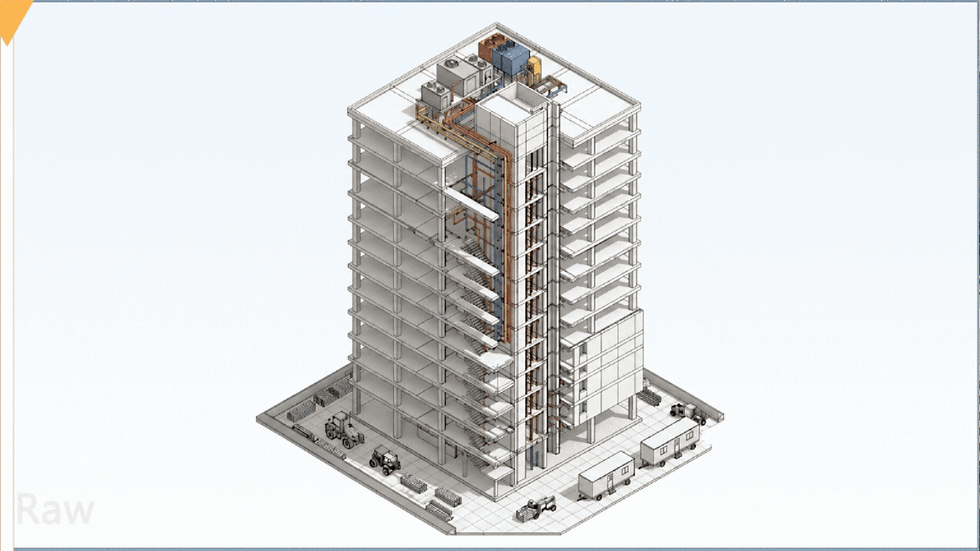
A practical workflow for better results
A strong workflow keeps the process clean from model to site review.
Define the use case
Decide whether the walkthrough is for design review, client approval, site coordination, safety planning, marketing, or handover.
Audit the BIM model
Check model health, scale, categories, links, materials, and unnecessary detail.
Prepare model zones
Break the project into usable areas such as lobby, typical floor, basement, terrace, plant room, façade, or amenities.
Export with the right format
Choose the exchange method based on software, model complexity, and required data.
Build the VR environment
Set lighting, materials, navigation, viewpoints, interaction points, and performance settings.
Run a spatial review
Walk through key zones with architects, engineers, project managers, site teams, and client representatives.
Capture issues clearly
Record each issue with location, screenshot, description, responsible team, and decision status.
Update and repeat
Push approved changes back into the design and coordination process. Review again when major updates happen.
This cycle makes VR useful beyond presentation.
Where AR fits with VR on site
VR places users inside a fully virtual environment. AR overlays digital content onto the real world through a phone, tablet, or headset.
Both have value.
VR works well before work is built. AR helps compare model intent with physical site progress.
For example, AR can show where a wall, duct, or equipment unit should sit on site. It can help teams compare planned and actual installation. It can also support inspection and client walkthroughs.
AR and VR Walkthrough Videos are useful when teams need both immersive review and clear presentation. VR supports decision-making. AR supports context on site. Video makes the experience easy to share with people who cannot attend the session.

The role of animation in BIM and engineering communication
Not every stakeholder can use a headset. Not every review needs interactive VR. This is where animation helps.
3D BIM Animations can explain construction sequence, structural systems, façade installation, MEP routing, or phasing plans in a clear visual format. They work well in technical meetings, tender presentations, stakeholder briefings, and project approvals.
Engineering Animation Videos are useful for processes that are hard to explain through drawings. Examples include plant room operations, equipment movement paths, mechanical assemblies, bridge components, industrial workflows, and infrastructure systems.
Animation gives control. The viewer sees the exact sequence, angle, and message needed. VR gives freedom. The viewer explores at their own pace. Strong project communication often uses both.
How developers use walkthroughs for sales and approvals
Real estate and infrastructure projects need more than technical coordination. They also need clear public-facing communication.
3D Walkthrough Videos help present the project experience before it is built. They can show arrival zones, interiors, amenities, landscaping, views, lighting, and lifestyle context without depending on static renders alone.
Project trailers and Promos help create a concise story around the development. They are useful for launches, investor decks, pre-sales, exhibitions, website pages, and social campaigns. The best ones stay grounded in the actual design, while still making the project easy to understand and remember.
This is where accurate modelling matters. A promotional visual that does not match the design can create confusion later. A model-led workflow keeps the visual story closer to the project reality.
What to check before choosing an arch viz partner
Architectural visualisation is both technical and creative. The right team should understand design intent, construction logic, lighting, scale, and presentation.
Before starting, check whether the team can handle:
3D BIM Modeling for accurate geometry and coordination use
Real time walkthroughs for review and decision support
VR environment development for immersive spatial analysis
AR previews for site and presentation use
Animation for construction and engineering communication
Cinematic project videos for marketing
Clear delivery formats for meetings, websites, headsets, and events
Also check how the team handles revisions. Built projects change. Visual assets should be planned with enough flexibility to reflect approved design updates.
Film by Him brings BIM, VR, and architectural visualisation together
A strong spatial review system needs more than a model export. It needs clean modelling, technical accuracy, real time preparation, visual quality, and clear storytelling.
Film by Him provides architectural visualisation services as a one stop solution for project teams, developers, architects, engineers, and real estate brands. The team works across 3D Walkthrough Videos, 3D BIM Modeling, 3D BIM Animations, AR and VR Walkthrough Videos, Engineering Animation Videos, Project trailers and Promos.
This helps keep the visual and technical communication in one connected process. A project can move from BIM-based modelling to immersive VR review, then into animations, walkthrough videos, and launch-ready presentation assets.
For teams that need arch viz support for design communication, approvals, sales, or on-site spatial analysis, connect with Film by Him’s architectural visualisation team.
The takeaway
Integrating BIM with VR walkthroughs makes spatial decisions clearer, faster, and easier to explain. It helps teams see access issues, coordination risks, design conflicts, and user experience problems before they become expensive site changes.
The best results come from a planned workflow. Clean the model. Define the purpose. Prepare the VR environment carefully. Review with the right people. Record decisions. Update the design.
When the same visual system supports technical review, client communication, and project marketing, the project gains consistency from concept to completion.
Your Next Big Dream Project Deserves Better Than Average ArchViz. Let’s Connect and Make It Unforgettable.


Comments