
Why iPhone 18 Pro Is a Mastertool for Filmmakers

A camera becomes serious when it saves time without lowering the quality of the image. That is why the iPhone 18 Pro stands out for mobile production. It brings together physical lens control, professional video formats, stronger low-light capture, and post-shoot focus tools in one pocket-sized device.

For years, phones have been useful as backup cameras, behind-the-scenes tools, location scouts, and social content devices. The real test has always been whether a phone can hold up when the footage needs to cut into a polished film, client video, music promo, travel piece, event recap, or documentary sequence. The iPhone 18 Pro makes that question more interesting because its best features are not gimmicks. They solve real production problems.
The headline feature is the variable aperture on the 48MP Fusion main camera. It uses six ultra-thin laser-cut blades and shifts between f/1.48, f/1.8, f/2.8, and f/4.0. That matters because aperture is not just a spec. It affects exposure, depth of field, sharpness, and the emotional feel of a shot.
Pair that with manual controls in the native Camera app, 4K Dolby Vision video, ProRes RAW, Apple Log 2, and post-capture Cinematic mode effects, and the phone starts to behave less like a convenient device and more like a compact production system.
Variable aperture gives real creative control
Most smartphone cameras rely heavily on computational photography. That can be useful, but filmmakers often need control that is physical and predictable. A real aperture mechanism changes the way light enters the camera. It also changes the way the background falls out of focus.
The iPhone 18 Pro’s variable aperture gives four useful options:
Aperture | Best use | Creative effect |
f/1.48 | Night scenes, interiors, mood shots | More light and stronger background blur |
f/1.8 | Interviews, handheld low-light work | Bright image with natural separation |
f/2.8 | General scenes, controlled lighting | Balanced sharpness and depth |
f/4.0 | Group shots, landscapes, action blocking | Deeper focus and clearer background detail |
This is important on set because depth of field affects storytelling. A close-up at f/1.48 can isolate a character from a noisy background. A group scene at f/4.0 can keep several faces sharp in the same frame. That choice used to push creators towards dedicated camera bodies and lenses. Now, the same basic creative decision can happen inside a phone camera.
A practical example makes this clear. Imagine shooting a short scene in a small café at night. At f/1.48, the camera can take in more light and create a soft background behind the actor. If the next shot shows two characters across the table, stopping down to f/2.8 or f/4.0 helps keep both faces sharper. That is not just convenience. It changes how quickly a scene can be blocked, shot, and adjusted.
Pro Controls make the native Camera app more serious
Manual controls are one of the biggest signs that a device is ready for production work. Auto mode can be helpful, but it can also ruin a shot by changing exposure or colour in the middle of a take.
The new Pro Controls in the native Camera app bring hands-on control over:
Aperture
Shutter speed
White balance
Live histogram
Each one solves a specific problem.
Shutter speed affects motion blur. A filmmaker shooting at 24 fps often wants a shutter near 1/48 for natural-looking motion, based on the widely used 180-degree shutter principle from cinema cameras. If the shutter is too fast, movement can look harsh and staccato. If it is too slow, action can smear.
White balance protects colour consistency. If a camera shifts from warm to cool during a shot, skin tones and backgrounds can become difficult to match in the edit. Locking white balance gives the colourist a cleaner starting point.
A live histogram helps expose the image with more confidence. Instead of guessing from the screen, the histogram shows whether highlights are clipping or shadows are crushed. On a bright Indian afternoon, for example, a phone screen can be hard to judge outdoors. A histogram gives a more reliable read.
These tools reduce one of the biggest risks in fast production: discovering in the edit that a shot looked fine on set but falls apart under grading.
Post-capture Cinematic mode changes the safety net
Focus is one of the easiest things to miss on a small screen. A performance may be perfect, the camera movement may be smooth, and the lighting may work, but if the focus lands on the wrong subject, the take can become unusable.
The iPhone 18 Pro’s ability to apply Cinematic mode effects after shooting changes that workflow. Instead of committing every depth effect during capture, creators can record standard video and later add:
Shallow depth of field
Rack focus
Smooth subject tracking
Cinematic focus changes at up to 60 fps
This gives the edit room more control. If the story works better when focus shifts from one actor to another, that decision can happen after the take. If a subject steps forward unexpectedly, tracking can be refined later. If a background is distracting, shallow depth can help guide attention.
This does not remove the need for good shooting discipline. Framing, lighting, blocking, and performance still matter. But it gives productions a wider safety margin. For solo creators and small crews, that can prevent reshoots.
There is also a storytelling benefit. Rack focus is a classic visual technique. It moves attention from one subject to another within the same shot. Traditionally, it requires a lens with controlled focus movement, a focus puller, or careful rehearsals. Post-capture control makes that language easier to use in smaller productions.
ProRes RAW and Apple Log 2 support serious grading
A phone video can look sharp and still fail in post if the file has too little colour information or too much baked-in contrast. That is where professional codecs and log recording matter.
ProRes is widely used in post-production because it holds up better during editing than highly compressed formats. ProRes RAW goes further by preserving more sensor data for colour and exposure adjustments. Apple Log 2, as described for this camera system, gives colourists a flatter image with more room to shape contrast and colour.
That matters for three common production needs.
Matching multiple cameras
Many productions mix camera sources. A scene may include a cinema camera, a drone, and a phone shot captured in a tight space. Log footage gives the colourist more flexibility to match tones across devices.
Protecting highlights and skin tones
High-contrast locations are difficult. A wedding stage, a music video with LED panels, or a street scene under harsh sun can produce blown highlights. Better grading latitude helps recover a more balanced look, as long as the original exposure is well managed.
Building a consistent look
A film does not feel finished just because it is sharp. Colour gives it mood. Warm highlights, cooler shadows, softer contrast, or strong saturation choices all affect the viewer’s response. Log capture gives that creative work more room to breathe.
The key point is simple: capture quality affects post-production freedom. The better the file, the more control the editor and colourist have before the image breaks.
Low-light performance makes small crews faster
Low-light shooting has always been a phone camera weakness. Small sensors struggle when light drops. Noise appears, skin tones suffer, motion blur increases, and artificial sharpening can make footage look brittle.
A wider f/1.48 aperture gives the iPhone 18 Pro a practical advantage because it lets more light reach the sensor. Combined with improved processing and professional controls, it can help capture cleaner footage in dim spaces.
This is useful in real working conditions:
A documentary subject is available only in the evening.
A restaurant shoot cannot bring in a large lighting setup.
A travel film needs a night street sequence.
An event recap must move quickly between different lighting conditions.
A short film crew has limited access to a location.
Traditional lighting still produces the best results when time and budget allow. A well-lit scene will usually beat a rescued low-light scene. But the ability to shoot usable footage with less gear changes the pace of production. It also opens up locations where a large camera rig may attract attention or slow down the moment.
One device reduces the load without removing craft
The strongest argument for the iPhone 18 Pro is not that it replaces every cinema camera. It does not. Large sensors, interchangeable lenses, built-in ND filters, cinema rigging, long recording workflows, and professional monitoring still matter for many productions.
Its strength is that it reduces friction.
A smaller kit means fewer batteries, fewer cases, fewer lens changes, and faster movement between shots. For run-and-gun work, client reels, indie scenes, vertical and horizontal versions, travel films, and test shoots, that speed can be the difference between getting the shot and missing it.
Filmmakers who handle several roles at once need tools that respond quickly. A phone that can record 4K Dolby Vision, track focus intelligently, capture in professional codecs, and allow manual exposure decisions brings serious value to fast-moving sets.
Here is where it fits especially well:
Production need | Why the iPhone 18 Pro helps |
Short social films | Fast capture with strong image quality |
Indie scenes | Small footprint and manual control |
Behind-the-scenes footage | Easy to carry while still looking polished |
Client content | Quick setup and high-resolution delivery |
Travel films | Low gear weight and flexible shooting |
Documentary work | Less intrusive during real moments |
The value is not only technical. Smaller gear can change how people behave on camera. A large rig can make a subject stiff. A phone can feel less intimidating, which helps in interviews, observational scenes, and intimate documentary moments.
The camera is only half the film
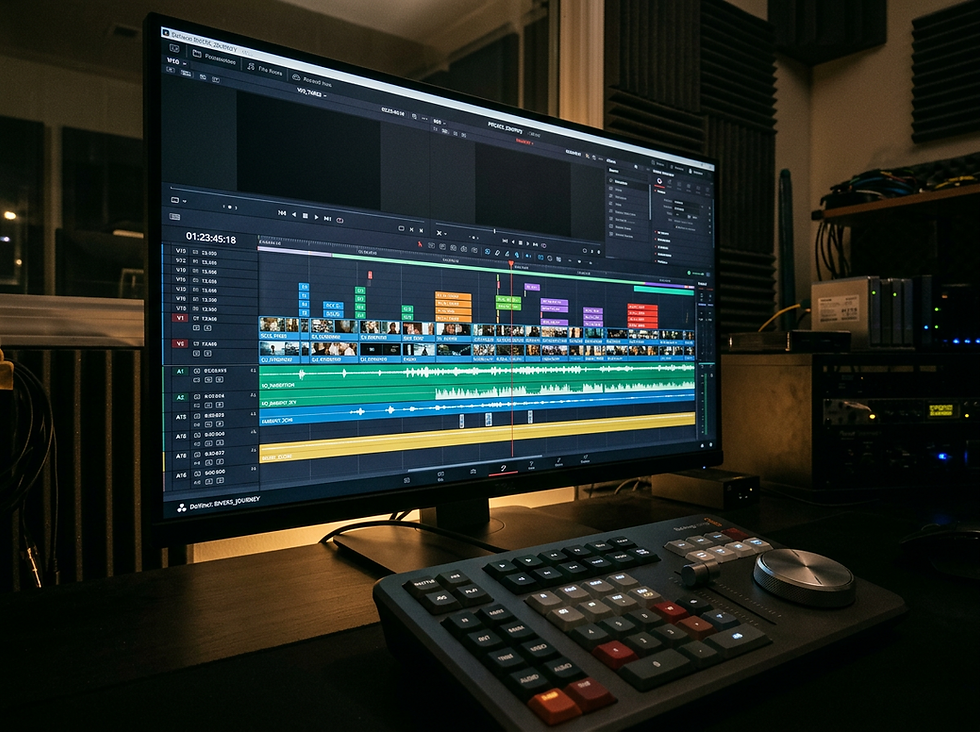
A strong capture tool can produce beautiful footage, but it does not finish the story. Post-production is where raw material becomes a polished film. Editing controls rhythm. Colour grading builds mood. Sound design adds weight and realism. Motion graphics clarify ideas. VFX can remove distractions or create moments that were not possible during the shoot.
This is where many phone-shot projects rise or fall.
A clip may have great dynamic range, but poor editing can make it feel flat. A scene may be shot in Log, but weak grading can leave it washed out. Dialogue may be clear enough on set, but without sound cleanup, mixing, and ambience, the final video can still feel unfinished.
A complete post workflow often includes:
Selecting the strongest takes
Building the story structure
Syncing and cleaning dialogue
Adding sound effects and ambience
Colour correcting each shot
Applying a final creative grade
Designing titles or motion graphics
Exporting versions for different platforms
The iPhone 18 Pro gives creators more usable material. Post-production turns that material into something people want to watch until the end.
For editing, colour grading, sound design, motion graphics, and VFX support, visit Film by Him to shape captured footage into a finished visual story.
The real reason the iPhone 18 Pro matters
The iPhone 18 Pro matters because it brings core filmmaking decisions closer to the moment of capture. Aperture is no longer just simulated. Manual controls are no longer hidden behind specialist apps. Focus effects are no longer locked at the time of shooting. Professional video formats give editors and colourists more room to work.
That combination makes it a mastertool, not because it replaces every camera, but because it makes high-quality production faster, lighter, and more flexible.
The best camera is still the one used with intention. The iPhone 18 Pro gives creators more control over that intention, from the first frame on location to the final grade in post.
Bring your ideas to life with Film by Him
We deliver end-to-end motion graphics solutions designed to make your brand stand out. Get in touch with our team today



Comments