
Unlocking 3D Architectural Rendering and BIM Animation for Modern Design and Marketing

3D architectural rendering has transformed the way architects, designers, and developers visualize and communicate their projects. It offers a vivid, realistic view of buildings before construction begins, helping stakeholders make informed decisions and enhancing marketing efforts. This post explores what 3D architectural rendering is, the software behind it, types of 3D models, how to create renderings, and the impact of commercial architectural renderings on marketing.
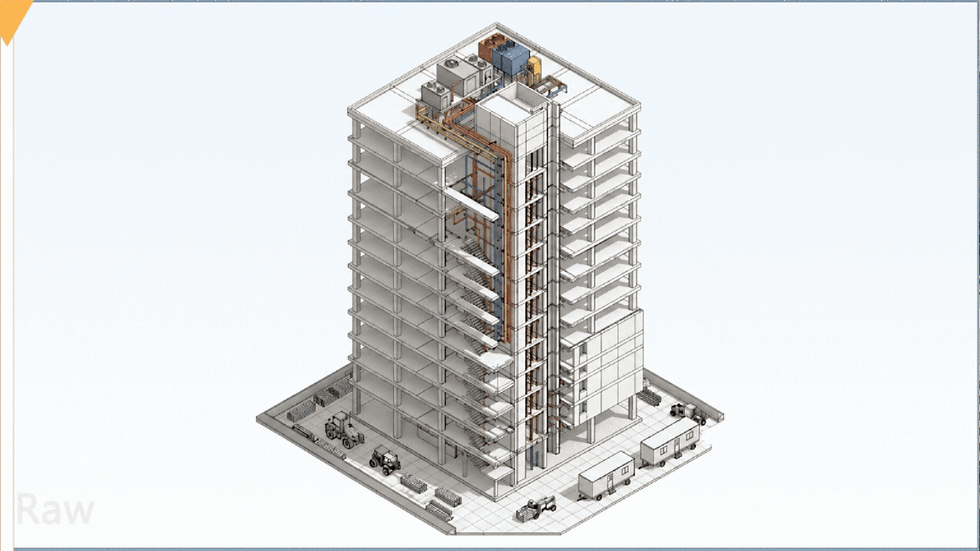
What Is 3D Architectural Rendering and Why It Matters
3D architectural rendering is the process of creating three-dimensional images or animations that represent architectural designs. Unlike traditional 2D blueprints or sketches, 3D renderings provide a lifelike visualization of a building’s exterior and interior. This helps architects, clients, and contractors understand the design intent clearly.
The importance of 3D architectural rendering lies in its ability to:
Improve communication between architects, clients, and construction teams.
Identify design flaws early by visualizing spaces realistically.
Enhance presentations to investors or regulatory bodies.
Support marketing efforts by showcasing projects before they are built.
For those searching for a BIM coordination company near me, 3D renderings often integrate with BIM (Building Information Modeling) workflows to ensure accuracy and collaboration.
Understanding 3D Architecture Software and Its Role
3D architecture software is the toolset architects and designers use to create 3D models and renderings. These programs allow users to build detailed digital representations of buildings, including textures, lighting, and environmental effects.
Common features of 3d architecture design software include:
Modeling tools for creating walls, roofs, windows, and other elements.
Material libraries for realistic surface finishes.
Lighting simulation to mimic natural and artificial light.
Rendering engines that produce photorealistic images.
Popular software options include Autodesk Revit, SketchUp, 3ds Max, and Lumion. These tools often support architectural BIM consulting services by integrating with BIM platforms, enabling seamless collaboration between architects, engineers, and consultants.

Types of Architectural Design 3D Models and Their Uses
Architectural 3D models vary depending on their purpose and level of detail. Here are some common types:
Conceptual Models: Simple shapes and forms used early in the design process to explore ideas.
Detailed Design Models: Include precise dimensions, materials, and structural elements for construction documentation.
Presentation Models: Highly detailed and textured models used for client presentations and marketing.
Virtual Reality Models: Interactive 3D environments that allow users to explore spaces in real time.
BIM Models: Data-rich models that combine geometry with information about materials, costs, and schedules.
Each type serves a specific role, from initial brainstorming to final marketing campaigns. For example, archi 3d models used in presentations help clients visualize the final product, while BIM models support construction and facility management.
Step-by-Step Guide to Creating Architectural Renderings
Creating a high-quality architectural rendering involves several key steps:
Gather Design Data
Start with architectural plans, elevations, and sections. If working with a consultant BIM, ensure BIM data is accurate and up to date.
Build the 3D Model
Use 3D architecture software to create the building’s geometry. Pay attention to dimensions and structural details.
Apply Materials and Textures
Add realistic surfaces such as brick, glass, wood, or concrete. This step enhances the model’s visual appeal.
Set Up Lighting
Simulate natural sunlight and artificial lighting to create shadows and highlights that add depth.
Add Environment Elements
Include landscaping, surrounding buildings, and sky backgrounds to provide context.
Render the Scene
Use the software’s rendering engine to generate photorealistic images or animations.
Post-Processing
Edit the rendered images in software like Photoshop to adjust colors, contrast, and add effects.
Following these steps ensures the final rendering is both accurate and visually compelling.
The Role of Commercial Architectural Renderings in Marketing
Commercial architectural renderings play a crucial role in marketing real estate developments and commercial projects. They help developers and architects:
Attract investors and buyers by showcasing the project’s potential.
Communicate design intent clearly to stakeholders.
Create promotional materials such as brochures, websites, and advertisements.
Reduce misunderstandings by providing a clear visual reference.
For example, a 3D commercial building rendering can highlight features like storefronts, parking areas, and landscaping, making it easier for potential tenants or buyers to imagine the space.
Examples and Benefits of 3D Commercial Building Rendering
Consider a developer planning a new office complex. By using 3d models for architectural visualization, the architect can create detailed renderings showing the building’s facade, interior layouts, and surrounding environment. These images can be used to:
Present to city planners for approval.
Market the property to prospective tenants.
Coordinate with contractors through BIM management services.
Benefits include:
Faster decision-making by stakeholders.
Reduced costs by identifying design issues early.
Stronger marketing impact through compelling visuals.
Improved collaboration with teams using architectural BIM consulting services.
Architects who provide detailed architect 3d model renderings often find clients more engaged and confident in the project’s success.


Could you please add a blog on the tools that are helpful for BIM animation?